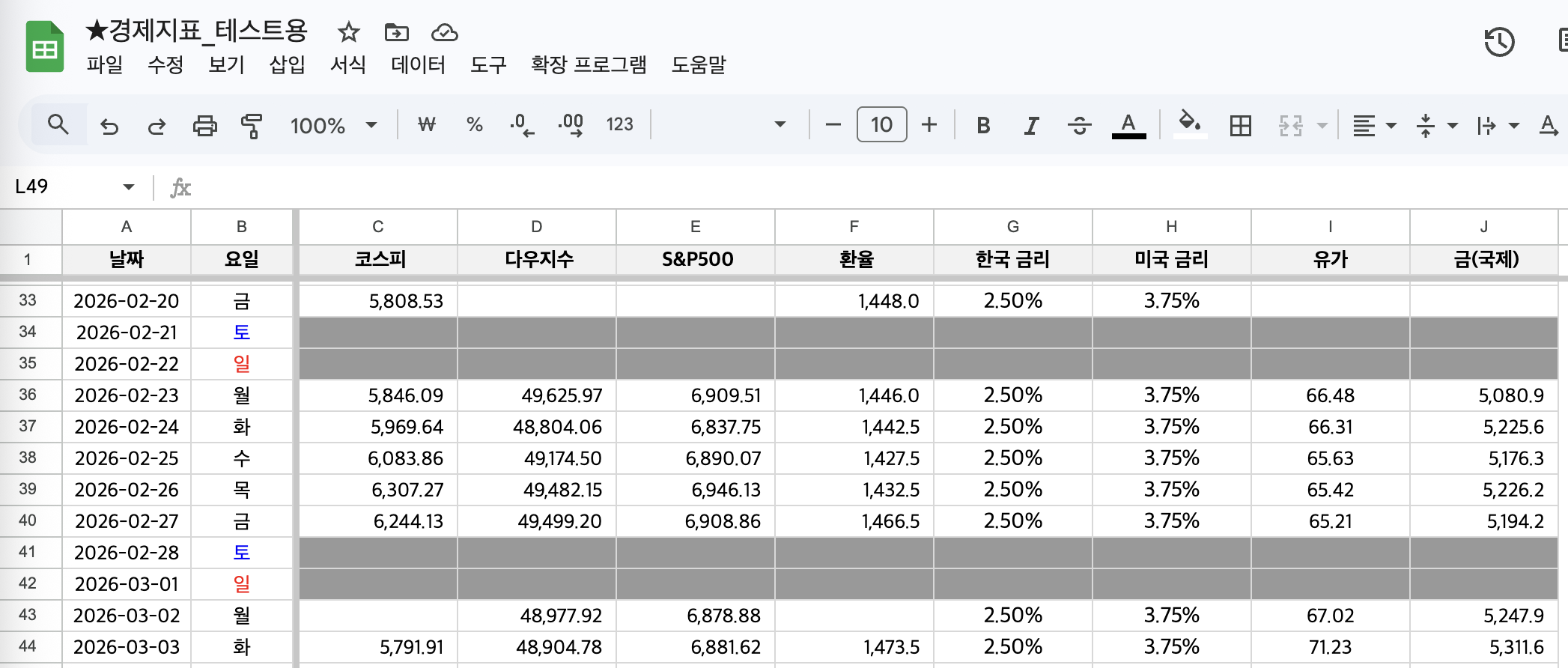
오늘은 네이버 증권(https://finance.naver.com/)에 있는 [국내/해외 지표(코스피, 다우지수, S&P500, 환율, 유가(WTI), 국제 금)의 최근 7일 데이터를 구글 스프레드시트에 한 번에 업데이트하는 방법]을 이야기하려 한다.
▼아래와 같이 구글 스프레드시트에 각 지표 최근 7거래일 데이터를 업데이트하는 거라 보면 된다.
📌이 글에 나오는 툴 정보📌
1️⃣ n8n
-url: https://n8n.io/
-여러 api를 한 번에 연동해 나만의 AI 에이전트 생성 가능 "구독 필요"
✨오늘의 작업 요약✨

정말 복잡하다. 이거 작업하는데 쓴 내 시간을 생각하면...😢 개발 언어를 1도 모르는 나는, 챗gpt와 정말 많은 씨름을 했는데... 개발 지식이 있었다면... 프롬프트를 좀 더 잘 썼다면... 훨씬 빠르게 문제를 해결하지 않았을까? 란 아쉬움도 있다.
각설하고,
국내와 해외 지표는 아래 조건으로 진행한다.
[조건_국내 지표]
1. 당일 종가 업데이트
2. 데이터가 없을 경우, 공란
[조건_해외 지표]
1. 전날 종가 업데이트
2. 데이터가 없을 경우, 공란
3. 월요일은 전 주 금요일 데이터 업데이트
각 과정별 내용을 간략히 이야기해보면,
① 각 지표의 url을 지정한다.
②~⑤ 해외와 국내 지표별로 url 규칙이 다르기 때문에 이를 한 번에 정리해 이후 절차에서 문제없도록 하기 위한 과정이라 보면 된다.
⑥ html 을 불러오면 아래와 같이 \n\t 이런 것들이 모두 불러와진다. 그래서 필요 없는 것들을 다 지우고 원하는 날짜, 종가만 가져오기 위한 과정이다.
class=\"header_area\">\n\t\t<div class=\"header_inner\">\n\t\t\t<div class=\"logo_area\">\n\t\t\t\t
<h1 class=\"service\">\n\t\t\t\t\t
<a href=\"https://www.naver.com/\" class=\"logo_link\" onClick=\"clickcr(this, 'STA.naver', '', '', event)
⑦ 해외/국내 각 조건에 맞춰 날짜를 가공하는 절차다.
⑧ 날짜별로 각 지표들을 정리한다.
⑨ 구글 스프레드시트에 최종 업데이트하도록 세팅하면 끝난다.
Part 1 ⑥번~
(우선, 기본으로 manual trigger 를 선택해 준다.)
[과정①] 각 지표 url 지정하기
code in javascript 를 추가하여 아래 코드로 세팅한다.
Mode Run Once for all items
Language javascript
Javascript
const assets = [
  {
    key: "KOSPI",
    group: "domestic",
    writeRule: "same_day",
    need: 7,
    urls: [
      "https://finance.naver.com/sise/sise_index_day.naver?code=KOSPI&page=1",
      "https://finance.naver.com/sise/sise_index_day.naver?code=KOSPI&page=2",
    ],
  },
  {
    key: "DOW",
    group: "overseas",
    writeRule: "next_business_day",
    need: 7,
    urls: [
      "https://finance.naver.com/world/sise.naver?symbol=DJI@DJI",
    ],
  },
  {
    key: "SP500",
    group: "overseas",
    writeRule: "next_business_day",
    need: 7,
    urls: [
      "https://finance.naver.com/world/sise.naver?symbol=SPI@SPX",
    ],
  },
  {
    key: "USDKRW",
    group: "domestic",
    writeRule: "same_day",
    need: 7,
    urls: [
      "https://finance.naver.com/marketindex/exchangeDailyQuote.nhn?marketindexCd=FX_USDKRW&page=1",
    ],
  },
  {
    key: "WTI",
    group: "overseas",
    writeRule: "next_business_day",
    need: 7,
    urls: [
      "https://finance.naver.com/marketindex/worldDailyQuote.naver?marketindexCd=OIL_CL&fdtc=2&page=1",
    ],
  },
  {
    key: "GOLD",
    group: "overseas",
    writeRule: "next_business_day",
    need: 7,
    urls: [
      "https://finance.naver.com/marketindex/worldDailyQuote.naver?marketindexCd=CMDT_GC&fdtc=2&page=1",
    ],
  },
];

// ✅ url별 referer 자동 매핑
function buildReferer(key, url) {
  if (url.includes("/world/worldDayList.naver")) return "https://finance.naver.com/world/";
  if (url.includes("/sise/sise_index_day.naver")) return "https://finance.naver.com/sise/sise_index.naver?code=KOSPI";
  if (url.includes("/marketindex/exchangeDailyQuote.nhn")) return "https://finance.naver.com/marketindex/exchangeDetail.naver?marketindexCd=FX_USDKRW";
  if (url.includes("marketindexCd=OIL_CL")) return "https://finance.naver.com/marketindex/worldOilDetail.naver?marketindexCd=OIL_CL&fdtc=2";
  if (url.includes("marketindexCd=CMDT_GC")) return "https://finance.naver.com/marketindex/worldGoldDetail.naver?marketindexCd=CMDT_GC&fdtc=2";
  return "https://finance.naver.com/";
}

const out = [];
for (const a of assets) {
  for (const url of a.urls) {
    out.push({
      json: {
        key: a.key,
        group: a.group,
        writeRule: a.writeRule,
        need: a.need,
        url,
        referer: buildReferer(a.key, url),
      }
    });
  }
}
return out;
[과정②] 각 지표 url들을 meta, fetch로 구분하기
쉽게 말하면 결괏값을 2개를 복사하는 것인데, 이걸 해놓지 않으면 나중에 http request 작업할 때 key, group, writerule 등의 값이 모두 지워지기 때문이다.(그룹이 나눠져야 구글 스프레드시트에 매칭할 수 있다.)
따라서 code in javascript 를 추가하여 아래 코드로 세팅한다.
Mode Run Once for all items
Language javascript
Javascript
// 01_duplicate_stream
// 입력 7개를 "meta" 스트림 7개 + "fetch" 스트림 7개로 복제

const items = $input.all();

const out = [];
for (const it of items) {
  out.push({ json: { ...it.json, _stream: "meta" } });
  out.push({ json: { ...it.json, _stream: "fetch" } });
}

return out;
[과정③] switch 로 meta / fetch 나누기
+를 클릭해 switch 를 추가한다. INPUT 데이터를 보면 meta, fetch 가 붙여져 2개 url이 생성된 것을 볼 수 있다. 이걸 나누는 것이라 보면 된다. (meta, fetch 이름은 다른 걸로 써도 된다.)
{{$json._stream}} is equal to meta
{{$json._stream}} is equal to fetch
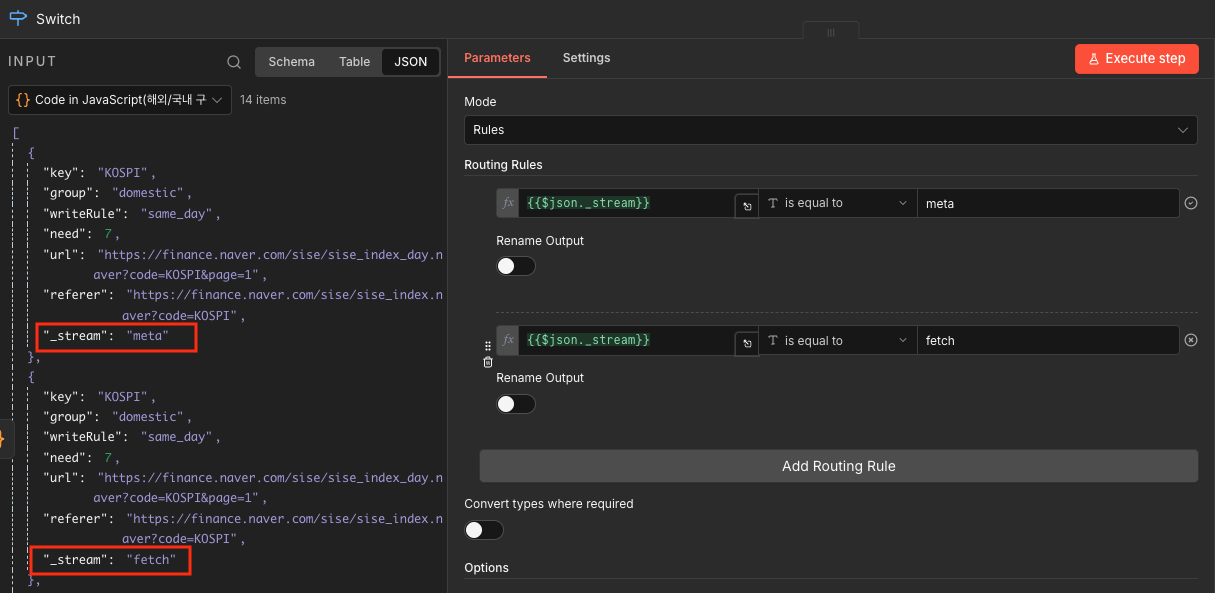
▼아래와 같이 switch0(meta)→merge input1, switch1(fetch)→http request(02_fetch_html)→merge input2 에 연결하면 된다.

[과정④] 각 지표들의 url 의 html 을 가져온다.
switch 1 에서 +를 클릭해 http request 를 추가해 아래와 같이 세팅한다. 과정①에서 각 지표별로 세팅한 URL 페이지의 html을 가져오는 과정이다.
❗️참고로 아래 Headers 에 여러 값이 들어가는 이유는, 다우지수/S&P500 페이지가 특히... ①인코딩(EUC-KR) ②헤더(User-Agent/Referer) 이슈로 빈화면/차단/깨진 문자를 받게 될 수 있기 때문이다.
Method GET
URL {{$json.url}}
Send Headers 토글 ON
Headers add header
NAME: User-Agent
VALUE: Mozilla/5.0 (Windows NT 10.0; Win64; x64) AppleWebKit/537.36 Chrome/120.0.0.0 Safari/537.36
NAME: Referer
VALUE: https://finance.naver.com/world/
NAME: Accept
VALUE: text/html,application/xhtml+xml,application/xml;q=0.9,*/*;q=0.8
NAME: Accept-Language
VALUE: ko-KR,ko;q=0.9,en-US;q=0.8,en;q=0.7
OPTIONS
REDIRECTS
Follow redirects 토글 ON
Max redirects: 21
Response
Response format text
Put output in field data

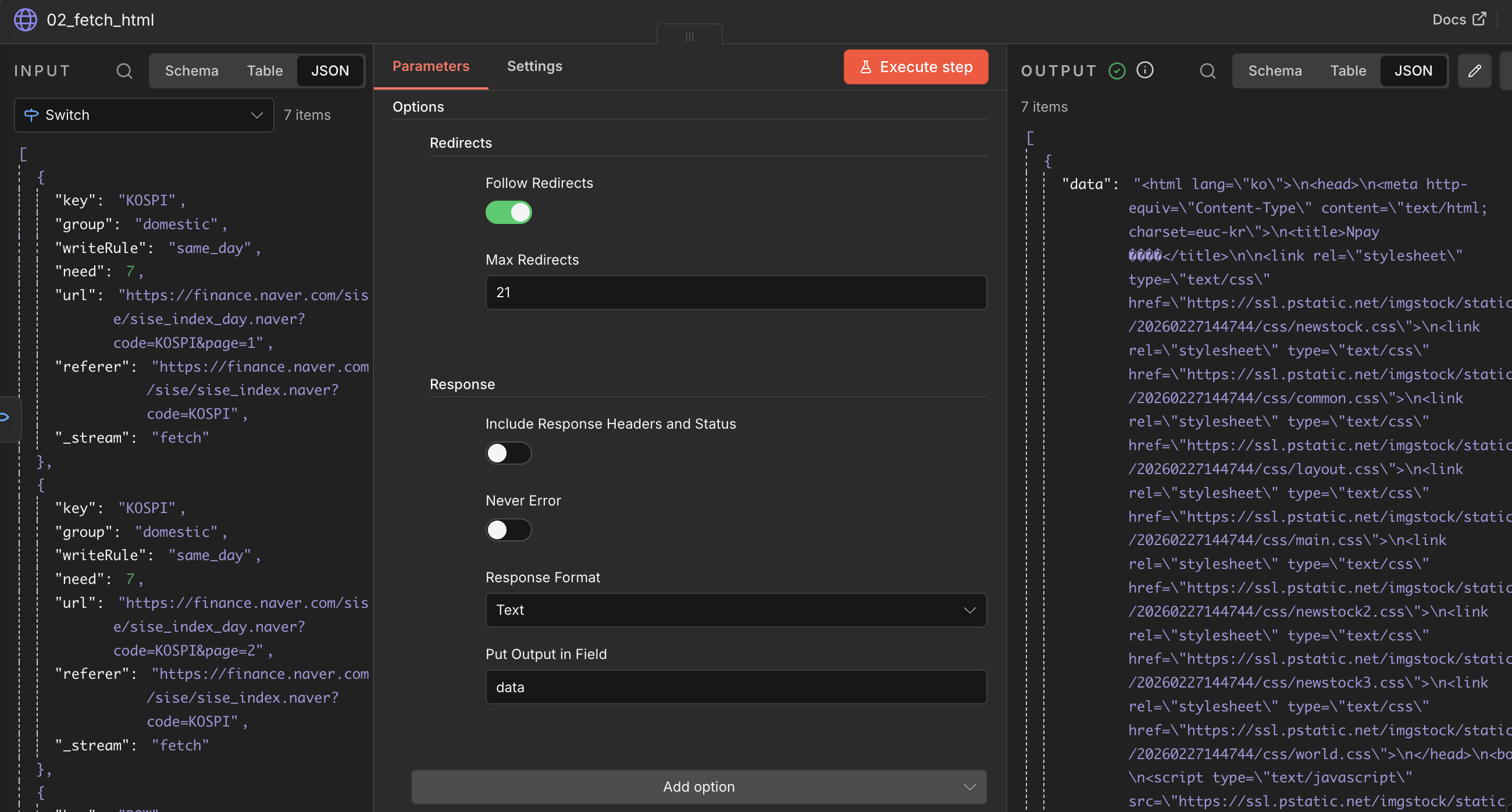
[과정⑤] http request(02_fetch_html)를 merge input2 에 연결한다
Part 2 ⑥번~

[과정⑥] ④번에서 가져온 html에서 불필요한 기호들을 제거한다.
Code in javascript 를 추가해 아래와 같이 세팅한다.
Mode Run Once for each items
Language javascript
Javascript
// 03_parse_html
// Mode: Run Once for Each Item
const key = $json.key ?? "";
const group = $json.group ?? "";
const writeRule = $json.writeRule ?? "same_day";
const need = Number($json.need ?? 7);
const url = $json.url ?? "";
const html =
(typeof $json.data === "string" && $json.data) ||
(typeof $json.body === "string" && $json.body) ||
(typeof $json.response === "string" && $json.response) ||
(typeof $json.html === "string" && $json.html) ||
"";
const out = { key, group, writeRule, need, url, rows: [] };
if (!key || !html) return out;
// ------------------------------------------------------
// 유틸
// ------------------------------------------------------
function cleanText(fragment) {
return fragment
.replace(/<script[\s\S]*?<\/script>/gi, " ")
.replace(/<style[\s\S]*?<\/style>/gi, " ")
.replace(/<[^>]+>/g, " ")
.replace(/ /g, " ")
.replace(/\s+/g, " ")
.trim();
}
function dotToDash(d) {
return d.replace(/\./g, "-");
}
function toNumber(v) {
return Number(String(v).replace(/,/g, ""));
}
// ------------------------------------------------------
// 1️⃣ 국내지수 KOSPI 전용
// ------------------------------------------------------
function parseKOSPI(html) {
const rows = [];
const trRe = /<tr[^>]*>([\s\S]*?)<\/tr>/gi;
let tr;
while ((tr = trRe.exec(html)) !== null) {
const rowHtml = tr[1];
// 날짜 있는 행만
const dateMatch = rowHtml.match(/<td[^>]*class=["']date["'][^>]*>\s*([\d]{4}\.[\d]{2}\.[\d]{2})\s*<\/td>/);
if (!dateMatch) continue;
const date = dateMatch[1].replace(/\./g, "-");
// 해당 행에서 number_1 중 첫 번째 값만 종가
const closeMatch = rowHtml.match(/<td[^>]*class=["']number_1["'][^>]*>\s*([\d,]+(?:\.\d+)?)\s*<\/td>/);
if (!closeMatch) continue;
rows.push({
key,
trade_date: date,
value: Number(closeMatch[1].replace(/,/g, "")),
});
}
return rows;
}
// ------------------------------------------------------
// 2️⃣ 해외지수 DOW / SP500 전용 (worldDayList)
// ------------------------------------------------------
function parseWorldIndex(html) {
const rows = [];
const trRe = /<tr[^>]*>([\s\S]*?)<\/tr>/gi;
let tr;
while ((tr = trRe.exec(html)) !== null) {
const rowHtml = tr[1];
const dateMatch = rowHtml.match(/(\d{4}\.\d{2}\.\d{2})/);
if (!dateMatch) continue;
const dateDot = dateMatch[1];
const date = dotToDash(dateDot);
const text = cleanText(rowHtml);
const idx = text.indexOf(dateDot);
const after = idx >= 0 ? text.slice(idx + dateDot.length) : text;
const numMatch = after.match(/([\d,]+(?:\.\d+)?)/);
if (!numMatch) continue;
rows.push({
key,
trade_date: date,
value: toNumber(numMatch[1]),
});
}
return rows;
}
// ------------------------------------------------------
// 3️⃣ 환율 / WTI / GOLD 등 범용
// ------------------------------------------------------
function parseGeneric(html) {
const rows = [];
const trRe = /<tr[^>]*>([\s\S]*?)<\/tr>/gi;
let tr;
while ((tr = trRe.exec(html)) !== null) {
const rowHtml = tr[1];
const dateMatch = rowHtml.match(/(\d{4}\.\d{2}\.\d{2})/);
if (!dateMatch) continue;
const dateDot = dateMatch[1];
const date = dotToDash(dateDot);
const text = cleanText(rowHtml);
const idx = text.indexOf(dateDot);
const after = idx >= 0 ? text.slice(idx + dateDot.length) : text;
const numMatch = after.match(/([\d,]+(?:\.\d+)?)/);
if (!numMatch) continue;
rows.push({
key,
trade_date: date,
value: toNumber(numMatch[1]),
});
}
return rows;
}
// ------------------------------------------------------
// key별 분기
// ------------------------------------------------------
let rows = [];
if (key === "KOSPI") {
rows = parseKOSPI(html);
}
else if (key === "DOW" || key === "SP500") {
rows = parseWorldIndex(html);
}
else {
rows = parseGeneric(html);
}
// ------------------------------------------------------
// 🔥 최근 7거래일 확정 (정렬 후 슬라이스)
// ------------------------------------------------------
rows = rows
.sort((a, b) => b.trade_date.localeCompare(a.trade_date))
.slice(0, need);
out.rows = rows;
return out;
[과정⑦] 최근 7거래일, 주말 제외 등 국내/해외 지표 날짜 조건을 설정한다.
Code in javascript 를 추가해 아래와 같이 세팅한다.
Mode Run Once for All items
Language javascript
Javascript
// 04_adjust_date
// Run Once for All Items

function isWeekend(date) {
  const day = date.getDay();
  return day === 0 || day === 6;
}

function nextBusinessDay(date) {
  const d = new Date(date);
  d.setDate(d.getDate() + 1);

  while (isWeekend(d)) {
    d.setDate(d.getDate() + 1);
  }
  return d;
}

function formatDate(d) {
  return d.toISOString().slice(0, 10);
}

const output = [];

for (const item of $input.all()) {
  const { key, group, rows } = item.json;

  if (!Array.isArray(rows)) continue;

  for (const r of rows) {
    let dateObj = new Date(r.trade_date);

    // 해외만 +1 영업일
    if (group === "overseas") {
      dateObj = nextBusinessDay(dateObj);
    }

    output.push({
      json: {
        key,
        group,
        trade_date: formatDate(dateObj),
        value: r.value
      }
    });
  }
}

return output;
[과정⑧] 날짜에 각 지표 데이터가 들어오도록 정리한다.
Code in javascript 를 추가해 아래와 같이 세팅한다.
Mode Run Once for All items
Language javascript
Javascript
const map = {};

for (const item of $input.all()) {
  const { key, trade_date, value } = item.json;

  if (!map[trade_date]) {
    map[trade_date] = {
      날짜: trade_date,
      코스피: "",
      다우지수: "",
      "S&P500": "",
      환율: "",
      유가: "",
      "금(국제)": ""
    };
  }

  if (key === "KOSPI") map[trade_date].코스피 = value;
  if (key === "DOW") map[trade_date].다우지수 = value;
  if (key === "SP500") map[trade_date]["S&P500"] = value;
  if (key === "USDKRW") map[trade_date].환율 = value;
  if (key === "WTI") map[trade_date].유가 = value;
  if (key === "GOLD") map[trade_date]["금(국제)"] = value;
}

return Object.values(map).map(v => ({ json: v }));
그러면 아래와 같이 [INPUT ► OUPUT] 이 나온다.

[과정⑨] 마지막으로, 구글 스프레드시트에 각 지표를 매칭해 주면 된다.
Google sheets ► Update row in sheet 노드를 추가한다.
❗️구글 스프레드시트 연결하는 자세한 방법은 아래 글 [두 번째, 구글 스프레드시트 연결하기] 파트 참고
https://ironyoo.tistory.com/33
[AI자동화] 구글 파이낸스 경제 지표 구글 스프레드시트 자동 업데이트하기(API 연동)
📌이 글에 나오는 툴 정보📌1️⃣ n8n -url: https://n8n.io/ -여러 api를 한 번에 연동해 나만의 AI 에이전트 생성 가능2️⃣SERPapi -url: http://serpapi.com/ -네이버 쇼핑, 네이버 뉴스, 구글 쇼핑 등 여러 api
ironyoo.tistory.com
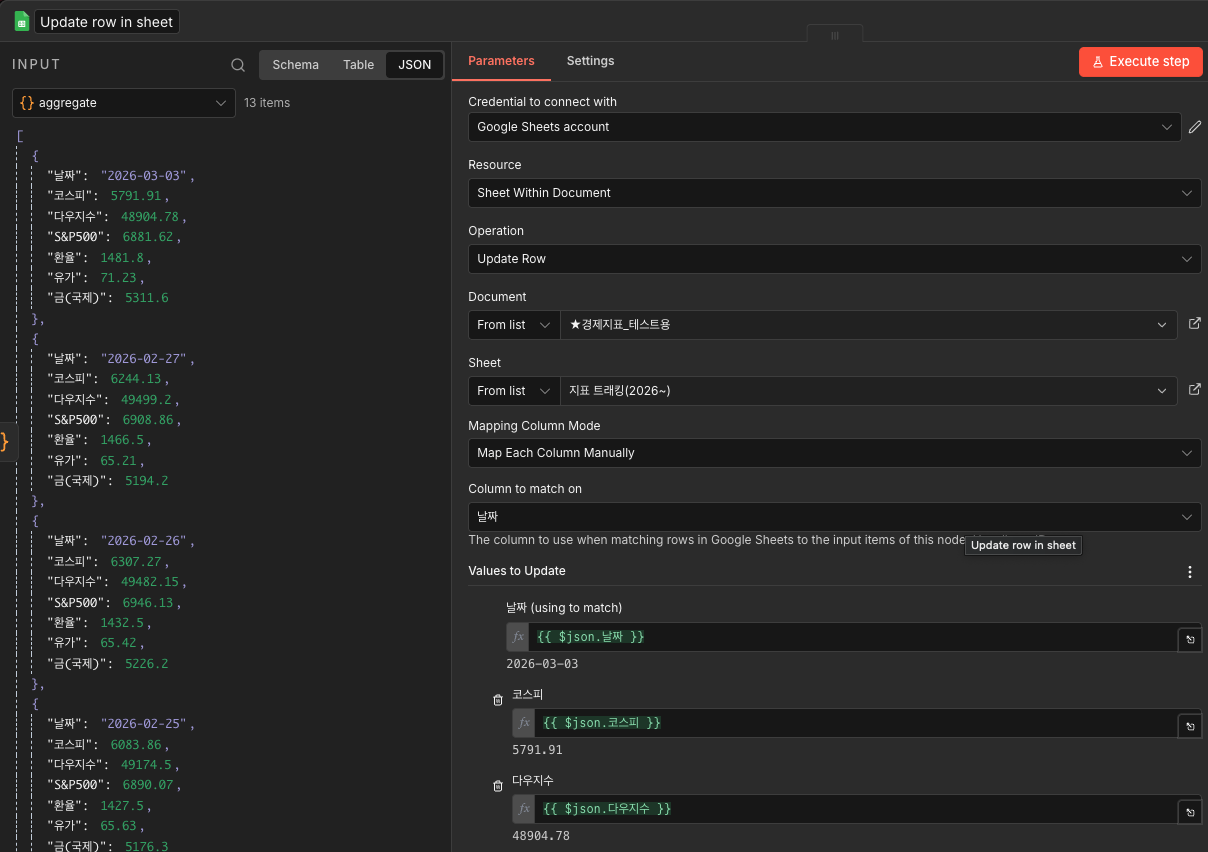

👏👏👏 최종 실행하면 아래와 같이 데이터가 촤라락 채워진다 😭(감동의 눈무류ㅠㅠ)
여기에 schedule trigger 를 맨 앞에 추가하고, 워크플로우를 publish하면 원하는 시간에 자동 업데이트되도록 할 수 있다.
(schedule trigger에서 실행 주기, 시간/분을 자세히 설정할 수 있다.)

‼️다만 코스피 페이지는 다른 페이지와 달리 페이지당 6개 데이터가 들어가 있다. 그래서 최근 7거래일을 코드로 설정해도, 2페이지에 있는 모든 데이터가 끌어와진다. 12개 데이터가 기록되는 셈.
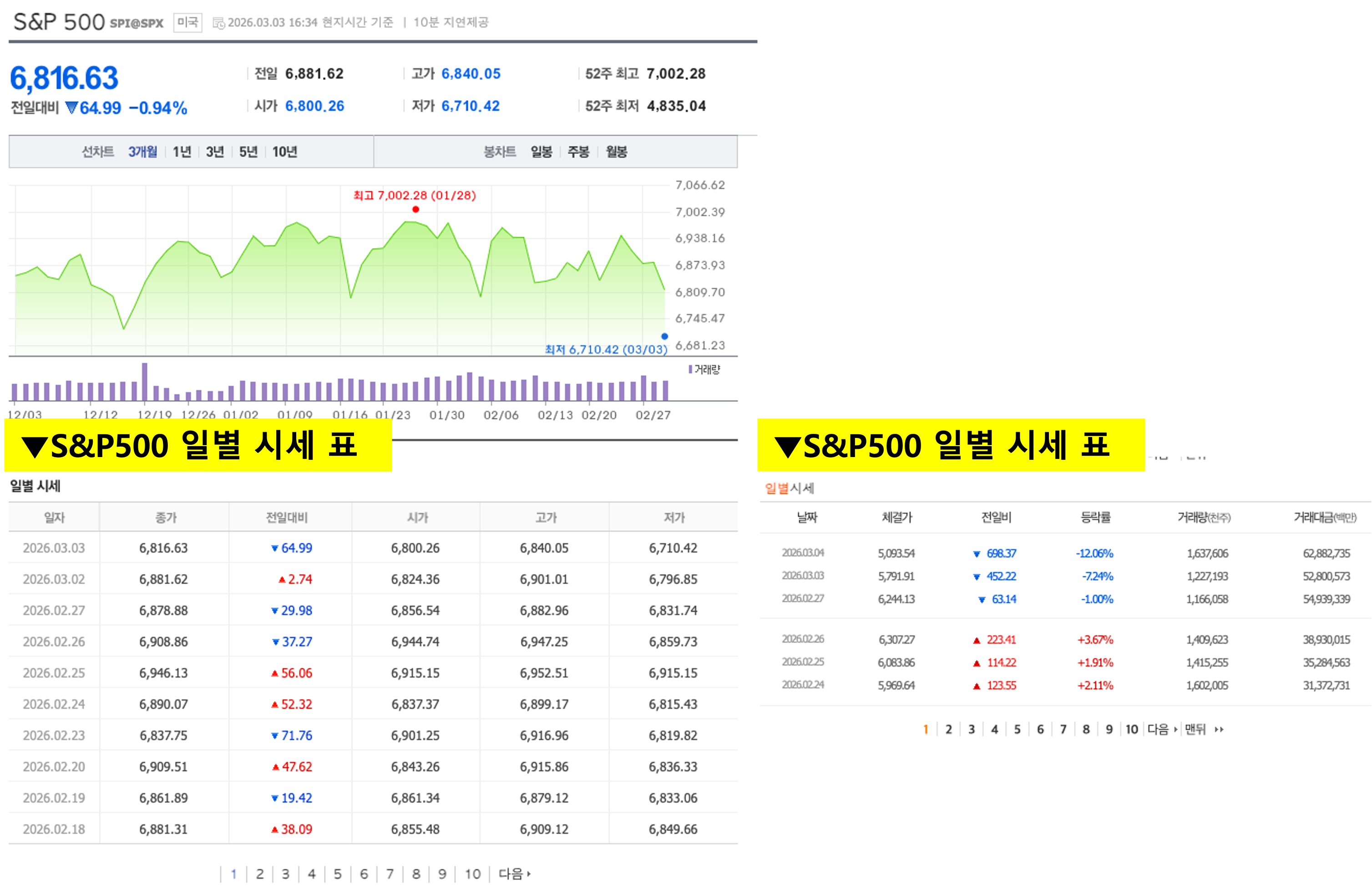
이걸 맞추려고 챗gpt와 여러 씨름을 했지만... 코스피와 다른 해외지표들(S&P500, 다우지수 등) 페이지가 달라 코스피만 2페이지 첫 번째 데이터만 가져올 수 없었다. HTML EXTRACT의 한계인 듯... 따라서 무난히 하려면 firecrawl(가입 및 구독 필요) 서비스를 활용하는 것이 좋다. FIRECRAWL을 활용하는 방법은 아래 2~3번 글로 확인 가능하다.
▼관련 글▼
| 1 | [AI자동화] 구글 파이낸스 경제 지표 구글 스프레드시트 자동 업데이트하기(API 연동) >>알수있는 것: N8N 활용_API 연동&구글 스프레드시트 연결(기본) |
https://ironyoo.tistory.com/33 |
| 2 | [AI자동화] 네이버 증권 크롤링 구글 스프레드시트 자동 업데이트하기(firecrawl, n8n) >>알수있는 것: 1번 내용+크롤링(firecrawl)+"전날 종가" 데이터 업데이트 |
https://ironyoo.tistory.com/36 |
| 3 | [AI자동화] 네이버 증권 크롤링 "최근 7일" 구글 스프레드시트 자동 업데이트(firecrawl, n8n) >>알수있는 것: 1번 내용+크롤링(firecrawl)+"최근 7일" 데이터 업데이트 |
https://ironyoo.tistory.com/37 |
| 4 | [AI자동화] 네이버 증권 "최근 7일" 구글 스프레드시트 자동 업데이트하기(html extract) >>알수있는 것: N8N html extract 활용+"최근 7일" 데이터 업데이트 |
https://ironyoo.tistory.com/38 |
| 5 | [AI자동화] 네이버 증권 "국내/해외 지표" 구글 스프레드시트 자동 업데이트(코스피, S&P500등) >>알수있는 것: N8N html extract 활용+"최근 7일"+여러 지표 업데이트 "현재 글" |
https://ironyoo.tistory.com/39 |
'AI > [AI_Personal] trial and error' 카테고리의 다른 글
| [AI자동화] 네이버 증권 "최근 7일" 구글 스프레드시트 자동 업데이트하기(html extract) (0) | 2026.03.02 |
|---|---|
| [AI자동화] 네이버 증권 크롤링 "최근 7일" 구글 스프레드시트 자동 업데이트(firecrawl, n8n) (0) | 2026.02.23 |
| [AI자동화] 네이버 증권 크롤링 구글 스프레드시트 자동 업데이트하기(firecrawl, n8n) (0) | 2026.02.16 |
| [AI자동화] 구글 파이낸스 경제 지표 구글 스프레드시트 자동 업데이트하기(API 연동) (0) | 2026.02.09 |
| GPTs action에 api 연동하여 쇼핑검색, 뉴스 크롤링하기(네이버, 구글) (0) | 2024.06.25 |